
An hour of dictation practice, and your neck is turned to one side the whole time
The team behind EasyDictation, a dictation tool that turns YouTube videos into listening practice, with our own transcription, phrase splitting and translation.
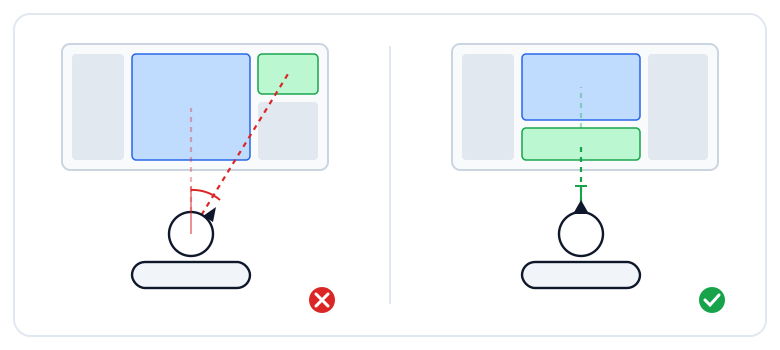
Think back to your last dictation session. The video plays in the middle of the screen. You finish a sentence, and your eyes slide right to find the typing box. You type, and your eyes slide back to the middle for the next sentence. One sentence, one glance sideways. A hundred-sentence video is two hundred glances.
When the eyes move, the head follows, even if only a little. The first thirty minutes are fine. By minute forty the back of your neck is stiff, and you can't say why.
We just changed the layout of the practice page because of exactly that.
The old layout made your eyes travel sideways
The EasyDictation practice page has three columns. The left one lists the sentences. The middle one holds the video. The right one was the practice area: replay buttons, the typing box, and below that the scoring and the translation.
It looks sensible. Everything about practising, gathered in one place. But sit through a real session and you notice the right column bundled two very different jobs together:
- Typing the sentence you just heard happens constantly, for every single sentence.
- Checking the score, looking up a word, reading the translation happens now and then, only when something went wrong.
When the constant job sits off to the side of the video, off to the side of where your eyes are already fixed, every sentence costs a head turn. The occasional job can live anywhere.
What you look at and what you do should share one axis
Anyone who spends the day at a computer has heard the ergonomics basics: screen at eye level, don't hunch over the laptop. There is a quieter rule that gets less attention: the thing you are looking at and the thing you are operating should be stacked vertically, on one straight line in front of you. The neck nods slightly up and down. It does not rotate.
Rotation is what tires the neck. The cervical spine tolerates a gentle nod for hours, but turning left and right a few hundred times in one sitting means the muscles on both sides of the neck are holding the head up continuously.
And dictation is exactly the kind of practice you sit through for a long time. A six-minute video usually takes thirty or forty minutes to transcribe. Regular learners do it every day. So the layout of this page is not a question of taste. It is your posture for the next few hundred hours.
The typing box now sits directly under the video
From this release, the middle column reads top to bottom: video, title, the replay and skip buttons, then the typing box. Finish listening, drop your eyes a little, type. Finish typing, lift your eyes a little, watch the next sentence. The head barely moves.
The right column keeps only the "now and then" part: the score, the hidden words, the translation. Glance over when something is wrong, move on when it isn't. No need to visit it for every sentence.
On short screens, the typing box stays pinned to the bottom edge of the middle column. The video can scroll away; the box does not, because it is the one thing you must never lose track of.
What moved along with it
Move one thing and a few others have to shift to keep up:
- The three video buttons (speed, hide video, captions) now sit on the same row as the video title. They adjust the thing directly above them, so that is where they belong.
- Today's goals moved to the top of the right column, with a collapse button in the footer. If you don't want the progress in view all session, fold it down to just the progress bar and your streak.
- The avatars of people who practised this video and the leaderboard button moved to the bottom of the left column, freeing the space above for the main work.
- On phones and iPads everything is tighter: a shorter footer, icon-only buttons in the navigation bar, and the "tap a hidden word" hint now shows on phones too.
Three tips for a long session
The layout takes care of the viewing axis. The rest is your chair:
- Raise the screen so the video is at eye level. A laptop flat on a desk means a bowed head for the whole session. A stack of books works fine.
- For long sessions, switch on focus mode. The fullscreen button next to the typing box. Only the waveform, the box and the result remain, nothing to pull your eyes away.
- Set today's goal and stop when it's done. Ten sentences is ten sentences. When the goal box says you're done, stand up, instead of squeezing in one more video and sitting for another forty minutes.
If it feels off, tell us
Moving something you use every day always feels strange for a few days. If it still gets in your way after a few sessions, or something looks out of place, head to the feedback board and tell us. This layout changed because we watched real learners use the old one, so your feedback is what decides whether it stays.
Learn English with videos you love
Paste any YouTube link and start dictation practice in seconds. Free to start.
Start free