
Changelog
All notable changes to EasyDictation will be documented here.
Improvements
- After the free portion ends, suggest public videos at the same level for continued practice. Show thumbnails and a “See more” link in one row, while clarifying the Pro option for unlocking the rest of the current video.
Improvements
- Place Daily Pulse first in the admin menu and keep it as the default view.
Improvements
- Simplify the Affiliate application form with fewer nested panels, shorter guidance and an improved mobile layout.
- Clearly separate submitted channels while preserving add, remove and pending application editing controls.
Improvements
- Admins can review each affiliate's visits/code uses, referred accounts, PRO buyers, revenue and commissions, search by name, email or code, and filter by month or all time.
- Compact performance lists on desktop and mobile with expandable affiliate details.
- Add morphing icons for expanding details, searching, copying referral links and saving payout information.
Improvements
- Refresh the Affiliate dashboard with Program, Performance and Reconciliation tabs, placing referral links and payout details beside results on desktop.
- Improve commission rows on mobile, monthly filters and metric explanations in tooltips.
- Fix the PRO avatar decoration causing horizontal navbar overflow on mobile.
Fixes
- Referral links can assign again after removal. Manual codes replace immediately; links replace an existing referrer only after 30 days.
- Preserve historical commissions and first-payment discount usage when attribution changes.
Improvements
- Show the referrer’s full name beside their code in PRO checkout.
- Allow removing a referrer for future payments while preserving past commissions and discount usage.
Improvements
- Explain referral discount eligibility, paused programs and unavailable referrers in checkout.
- Allow explicit referrer changes even after purchasing PRO. Only future transactions belong to the new referrer; previous commissions and first-payment discount usage are preserved.
Improvements
- Send an in-app notification and email with a dashboard link when an Affiliate application is approved.
- Admins can check email status and retry failed sends.
Improvements
- Apply for Affiliate with one or more owned channels. Admin approval unlocks referral links and codes.
- Track review status, read rejection reasons and update an application for resubmission.
Improvements
- All signed-in accounts can participate in Affiliate, including those that have never purchased PRO.
Fixes
- Fix Lemon Squeezy checkout failures by serializing affiliate metadata in the format required by the payment API.
Fixes
- Purchase history identifies migrated ED1 PRO access without mislabeling it as a Lemon Squeezy subscription.
Fixes
- Recognize migrated ED1 PRO purchases for affiliate participation and first-payment discount eligibility.
Improvements
- Affiliate participation requires a successful PRO payment, including after PRO access expires.
Fixes
- Referral links attribute existing FREE accounts when signed in, before their first PRO payment, while preserving the first valid referrer for 30 days.
Fixes
- Affiliate links redirect to pricing on the current public domain when served behind a reverse proxy.
New features
- Affiliate: Share a referral link or code and track visits, referred accounts and PRO buyers by month or across all time. Referred customers receive a discount on their first PRO payment, with first-referrer attribution held for 30 days.
- Commission reconciliation: Provide a payment QR or bank details, track commissions and view transfer receipts. Admins configure the program, the Lemon Squeezy discount code and monthly payouts.
New features
- Lookup understands short forms: Speech-to-text loves to drop apostrophes — transcripts say "theyre", "dont". Look one up and ED now resolves the word's true identity: the dictionary box shows they're, with real human recordings in both British and American voices, plus a "short form of they are" line. And it's no lazy listing: what's can be what is or what has — the AI reads the sentence you're hearing and names the one actually used. Guessed IPA for "theyre" is yesterday's problem.
Smarter lookup — short forms, phrases, save the whole chunk - See the word — and the phrase around it: Look up "fired" in they're going to be fired up… and the box adds: this word lives in the phrase fire up. Hit save and the dialog pre-selects the whole phrase "fired up" from the sentence — your notebook gets the unit worth learning, not a word stripped of its context. Just want the single word? Click to drop the rest.
Improvements
- One meaning across all three levels: the same word in the same sentence now gets the same meaning whether you're on Fluent, Natural or Steady.
New features
- Enter jumps straight to what needs fixing: When a sentence isn't 100% yet, the Next button becomes Check: each Enter hops the cursor to the next spot that needs you — wrong and extra words come pre-selected (type to replace, delete to drop), at a gap the cursor waits in place, and the loop wraps around. Entering a sentence works the same way: if you'd left it half-typed, the cursor lands right where you left off. Every hop plays a little "bruh" — swap the sound or turn it off in Settings. Hands never leave the keyboard.
Check — Enter jumps to what needs fixing - ↑/↓ walk the sentence word by word: With the cursor in the answer box, press ↓ for the next slot and ↑ for the one before — correct words, mistakes, extra words and gaps alike; hold the key to glide through, one cue sound per step. Rebind them in Settings → Shortcuts.
- Word lookup rebuilt: human voices, and the meaning in this sentence: Every word gets a real human recording in both British and American voices, matched to its exact form — recorded, went and comparing each have their own audio; plus a grammar line like "(n) · plural of conversation" and the meaning of the word as used in the sentence you're hearing, not a long list of senses to dig through. Saving to your notebook keeps that exact line; pick a multi-word chunk and each word gets its own line.
Improvements
- The speaker button now pulses while audio plays — you can see which row is talking. The quick guide and button tooltips were updated to match.
Improvements
- English only: ED no longer takes videos in other languages. Sentence splitting, phrase splitting and scoring work differently in every language, and each one is a craft of its own — the very machinery we rebuilt from scratch in 3.0.0 and are still sharpening. Spread that effort across four languages and all four stay mediocre. The add-video box drops the language step along with it: paste a link and go. The handful of non-English videos in the library have been removed, along with their dictation progress. One thing, done properly.
New Features
- A new generation of sentence splitting: Dictation only works when a sentence really is a sentence. Speech-to-text often drops sentence-ending periods, which is why a Fluent "sentence" could occasionally run as long as a whole paragraph. The AI now reads grammar and meaning to decide where each sentence truly ends instead of trusting punctuation; Natural and Steady are re-split into proper sense groups too. Newly added videos use this immediately; the existing library is being upgraded gradually. Before this overhaul we built a dedicated research rig to inspect every split: each sentence and each chunk across all three levels, side by side, until every cut truly carries meaning instead of just being short. Your ear can only learn the speaker's real rhythm when the sentences are right.
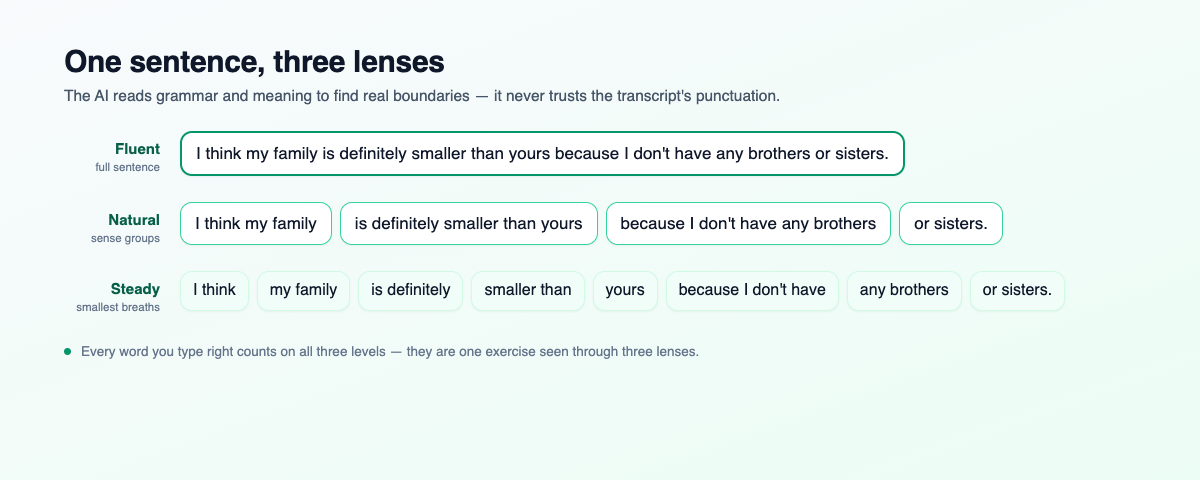
One sentence, three lenses — Fluent, Natural, Steady - Three levels, one exercise — every correct word counts everywhere: Fluent, Natural and Steady are now three views of the same dictation. Progress is tracked per WORD: whatever you type correctly at any level is recorded, and switching levels lights up exactly what you've done. Half-typed sentences — even extra or misspelled words — travel with you to the new level instead of disappearing.
- Smart level switching: Switch levels and you land right on the chunk containing the first word you haven't caught yet; the video rewinds to the start of that chunk and replays it, your draft is already in the box, and the cursor waits right before the missing word. Keep listening, keep typing — no hunting for where you were.
Improvements
- Typing is about 5× lighter: The entire keystroke path was reworked — the machine now does roughly a fifth of the work per keystroke, so characters appear instantly even on videos with thousands of chunks.
New Features
- Save a whole phrase, not just one word: The sentence you're on now sits inside the "Add to vocabulary" dialog, and every word in it is clickable. Tap "you" while "how" is selected and the box reads how are you — the words in between fill in on their own, so a phrase is always one unbroken piece. Tap the first or last word again to drop it, or type freely and the highlight follows what you wrote. Each word brings its own IPA. Save what you actually didn't catch.
- AI explains the word or phrase in your language (PRO): A button beside the Meaning box. It labels what you picked — noun, phrasal verb, idiom, collocation, clause, question… — and gives the sense it has in that sentence. For a longer phrase it translates the whole thing and glosses the one or two hard words. Pick something that isn't a real unit, like Carter and, and it says so and suggests the phrase to select instead.
- Listen button beside the IPA: A single word plays the Cambridge recording; a phrase is read by a natural US or UK voice, following the US/UK switch next to it.
- "Already in your notebook" is asked up front: Saving a word you already have used to fail only after you'd filled everything in. Now the old card shows the moment you tap save, and you choose: update it — the sentence you're on is offered as an extra example — or save a new card.
Improvements
- Several example sentences on one card: Examples you add are kept apart with a blank line, review cards show each on its own line, and the notebook shows the first.
- A clear button in the word box: One tap empties it, and the highlight, IPA and hints reset with it.
- The dialog now says "word or phrase": Title, label and placeholder updated in all languages.
Fixes
- A word's recording no longer plays after you switched to a phrase: If the recording was still loading when you pressed listen on a phrase, the old word was spoken right after the phrase.
Improvements
- The typing box now sits directly under the video: Listening in the middle column while typing in the right one meant a sideways glance for every sentence, and a stiff neck after a long session. The replay buttons and the typing box now live under the video, in the same column: finish listening, drop your eyes, type; finish typing, look up, next sentence. The right column keeps only the score, the hidden words and the translation. On short screens the box stays pinned to the bottom edge, so it never scrolls away. Look and act on one axis.
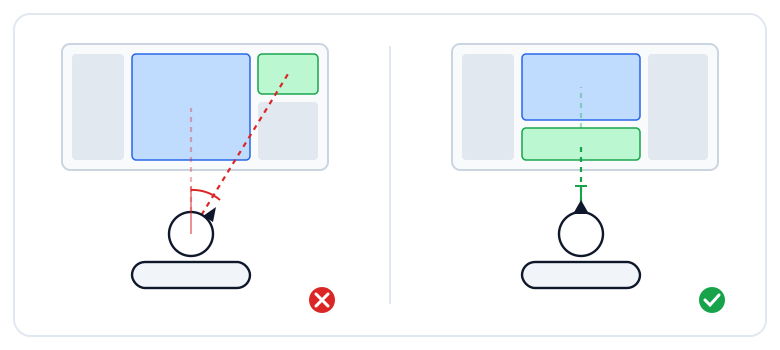
Look and act on one axis — the typing box now sits under the videoRead the post - Today's goals moved to the right column, with a collapse button: The goal box heads the right column. If you don't want the progress in view all session, tap the arrow in its footer to fold it down to the progress bar and your streak; the choice is remembered.
- Video title and the speed / hide video / captions buttons share one row: The three buttons adjust the thing right above them, so they now sit next to the title. The avatars of people who practised and the leaderboard button moved to the bottom of the left column.
- Tighter on phones and iPads: A shorter footer, icon-only Store / Blog / Language buttons in the navigation bar, and the goal box and leaderboard row hidden to save room.
Fixes
- The "tap a hidden word" hint shows on phones again: It was hidden below small screen sizes while still leaving a silent gap right above the word row.
New Features
- Today's goals: Opening the app without knowing how much is enough for today is how you end up swimming in one more long video and giving up halfway. Now you set your own daily goal across the five things ED can measure — dictation, vocabulary review, new words, shadowing and writing — and every sentence, card and word counts itself. Finish them all and the day is done, and your streak starts running. Know when the day is done.
Today's goals — five things ED measures, one line - Switch on only what you want: If you only want dictation, turn the other four off. Type the number straight in, or nudge it with +/−; dictation can also be set by time instead of sentence count. Your goal, not the app's.
- Goals where you actually study: A compact strip on Start here, the full box beside the Memory Rhythm chart in your Vocabulary Book, and a small one right in the learn page sidebar. Hover any goal and it tells you where to do it.
- Raising your goal doesn't cost you the streak: A day you already finished stays finished. Switch on three more goals today and your twelve-day streak survives — you never set those goals on those days. Done is done.
Improvements
- A much leaner learn-page sidebar: The progress block at the bottom is gone and the finished-sentence count moved up next to CAPTIONS. There's a new button that takes you back to the sentence you left off on, however far you've scrolled. The sentence list now shows about twice as many lines.
- Three level buttons in one row: Steady, Natural and Fluent sit side by side, and the explanation appears on hover. The active one is marked with a corner tick.
- Vocabulary Book relaid out: Today's goals now sits beside the Memory Rhythm chart instead of stacking above it, so there's less to scroll past.
Fixes
- Today's dictation count no longer includes the whole video: Reopening an old video where you had done 199 sentences showed 199 for today, even if you typed nothing. It now counts only what you added today.
- The campaign badge no longer covers the language menu: Opening the language menu hid one of the entries behind the promotion badge.
New Features
- Three new exercise types in the Vocabulary Book: Flipping cards gets dull, and grading yourself "I knew that" after seeing the back is easy to fake. Memory Rhythm now changes the question to match how well you actually know a word: newly met words come as Match, familiar ones as Hear the word and type it back, and words you know well as Type the chunk — the exact clip you first met the word in plays again, and you write it out. Nothing to choose; the app asks at whatever level you are at. The better you know it, the harder it asks.
Three new exercise types — Match, Hear the word, Type the chunk - Match: a warm-up for words you only recognise: One column of words, one of meanings. Pick a word, pick its meaning, and a green line ties the two together. Every decoy meaning comes from your own book in the same review batch, so guessing rarely works. Connect the last line and it moves on by itself. Recognise it first, recall it later.
- Hear the word: listening only, no peeking: The word is spoken and you type it back. Hearing a different word is a miss; a slipped letter still counts and only drops to hard. This is a listening app, not a spelling app. Replay as much as you like, but past two plays the card stops earning top marks. Catching the word is what proves you know it.
- Type the chunk: meet the word where you first tripped on it: When you save a word, ED remembers the clip you were listening to. In this exercise that clip plays again and you transcribe it. Only the word under review decides pass or fail, so a dropped "the" costs nothing. If the whole chunk feels long, hit Easy and the app fills in everything except the blank for the word you need to hear. The word lives in a real sentence, not in a list.
Improvements
- Look words up mid-review: In the chunk exercise, every revealed word is clickable, so you can open the dictionary and save a new word without leaving the session. Opening the word currently under review counts as a miss, of course, since that is the answer.
- The same shortcuts as the learn page: Replay, Easy and
Ctrl + numberto reveal a hidden word all use the keys you set in Settings → Shortcuts, so there is no second set to learn. Enter checks,Shift + Entergives up. - Missing one of the new exercises means tomorrow, not end of session: Only flashcards come back later in the same session, because that button says so before you press it. The three new types simply pull the schedule closer, and today's session stays exactly as long as it promised. Your session is as long as it looked when you started.
Fixes
- The session counter no longer runs past the total: Reviews sometimes showed impossible numbers like "25/21". The two halves of that counter were measuring different things and now count the same way.
- Words play the moment the card opens, without a second click: The hear-the-word exercise sometimes opened silent and only spoke after you pressed replay. Open the card, hear the word.
- Pronunciation in books no longer makes you wait: Tapping a word in a book could hang for a few seconds and then fall back to the robot voice instead of the real recording. It is always the Cambridge recording now, first tap included.
New Features
- EasyDictation now speaks Japanese and Chinese: The whole interface is available in Japanese at easydictation.app/ja and Simplified Chinese at easydictation.app/zh, along with the blog, this changelog, the bookstore, and article diagrams redrawn in each language. Pick one from the language menu. Learn English without having to read English first.
- Review direction follows your own language: The Auto / native → EN / EN → native selector in review sessions now names the language you actually set instead of always saying Vietnamese. Whatever you chose is what the button says.
- A 404 page that points somewhere: Open a page that does not exist and the message arrives in your language, with three ways out: back to practice, back home, or over to the blog.
Fixes
- Dialogs no longer answer in Vietnamese: The reprocess-this-video dialog, the resume-from-sentence dialog, the read-aloud setting and the video error screen were showing Vietnamese to everyone, including people reading the English interface. You read one language, the app answers in it.
- The Usage page is translated: Plan cards, quota labels and the upgrade panel were English-only, for Vietnamese readers too.
- Start-page filters are translated: The Level, Duration and Topic chips no longer stay in English.
- Notification times follow the language: The bell said "3 hours ago" no matter which language you were using.
- The add-video dialog is fully translated: The line explaining that AI builds the transcript and translation stayed in English for Vietnamese readers.
Improvements
- Choose your review direction: Vocabulary and book-memory review sessions now offer Auto, Vietnamese → English, and English → Vietnamese in the information column. Auto continues to progress from recognition to active recall through Memory Rhythm. Practise the direction you need.
- Both notebooks now fit mobile screens: Vocabulary and book-memory notebooks now adapt their spacing, rhythm banner, actions, filters, cards and review sessions to smaller screens. Self-rating actions stack vertically for clearer labels and larger touch targets. Review one-handed without zooming or horizontal scrolling.
- Notebook buttons are easier to use on mobile: Actions, filters, pronunciation controls, card menus and review-direction choices now resize cleanly, provide larger touch targets and stay within the screen. Reveal Answer spans the available width on phones. Fewer missed taps and no cramped labels.
- Responsive controls that fit their context: The book detail page, Reader navigation and review actions now use compact mobile sizing, spacing and natural wrapping instead of stretching every button full-width. “Mark as…” actions are quieter so forward navigation keeps the emphasis.
- The Memory Notebook gets the full mobile workspace: The Reader navbar hides while the notebook is open on phones and returns when it closes.
Fixes
- Book TTS now plays on the first mobile tap: Speech starts within the original user gesture instead of waiting for the browser voice list. While playback is prepared the audio control locks and shows a loading indicator, ignoring repeated taps until sound begins. No second tap required.
- Notebook cards no longer break on mobile: Long words or phrases, status badges and Memory Rhythm details now stay within narrow screens. Enter, Space and 1–3 keyboard hints are hidden on mobile devices as well. Only the touch actions remain.
- The Memory Notebook close button no longer overlaps mobile content: The in-reader notebook now has its own full-width header and divider, matching the Chatbot. Its close action stays in the header while notebook content scrolls independently below. A clear close action without covering the page.
- Book detail pages no longer overflow on mobile: The countdown, book metadata, unlock status, review content and trial action now shrink or wrap within the viewport.
New Features
- A memory notebook for every book: Finish a flashcard section and the words or phrases you learned are added automatically to that book's own Memory Notebook. Spaced repetition brings them back as you are about to forget, with dedicated review sessions, search, progress signals and reminders. Keep what you learn as the book unfolds.
Improvements
- A more seamless reading workspace: Contents, Memory Notebook and the AI tutor now open inside the reader, with consistent toggles and a clear message showing how to restore a closed panel. The toolbar also groups Contents, Memory Notebook, Chatbot, theme, notifications and profile in a predictable order. Switch tools without leaving the book.
- A clearer store flow: Selecting a book always opens its detail page, even after purchase; only the Start learning button goes directly to the reader. Browse when you browse, learn when you learn.
New Features
- A bookstore inside EasyDictation: The new Store holds interactive books written for EasyDictation. Chapter 1 of every book is free to try, with nothing to pay up front. To keep going, scan the QR code to transfer — the order matches itself within seconds and the book opens straight away. Not happy? You have a 3-day refund. Once bought, it's yours for life, updates included. Try the first chapter, then decide.
The Store — try a chapter free, buy by QR - "Chắp bút 1000 câu Writing" is out: The first title runs 30 topics across 4 weeks, with more than 1,000 Vietnamese → English sentences and over 1,000 words and phrases. Every topic opens with a reading built from the printed page: a vocabulary mind map, word tables with IPA and accurate pronunciation audio, contrast tables for the words learners keep mixing up, then sentence patterns and common mistakes. Sharing the shelf is "Phản Xạ Phỏng Vấn AI Engineer", 26 topics of English interview practice. A paper book gets read; this one makes you write.
- Write it, and AI marks it instantly: The exercise hands you one Vietnamese sentence at a time. Type your English and hit Check. Within seconds the AI answers: correct, almost, or needs work — pointing at each thing to fix and offering a more natural phrasing. The native reference answer is always one tap away, you can retry as often as you like, and no score is ever recorded. Getting it wrong is fine; not knowing where is not.
- Flashcards for every topic's vocabulary: Each reading now carries a Flashcard button that gathers every word and phrase in the topic. Topics with a lot of vocabulary come pre-split into parts of about 20 cards, so you finish one and move to the next. Flip Vietnamese → English or English → Vietnamese, hear the pronunciation on the card, and mark anything you haven't learned to come back to. Learn the words first; the writing gets easier.
- An AI tutor beside you through the lesson: In the reading, ask with one tap: explain this more simply, give real-life examples, summarise the theory, write extra practice sentences. In the exercise, ask about the exact sentence in front of you: hint me without the answer, is my grammar right, which words should I use. Ask where you're stuck, without opening another tab.
- Contents and progress, like a real course: The book is organised by week, each topic has a reading and an exercise, and finished items get ticked off. Close the tab mid-topic and EasyDictation asks whether to pick up where you stopped. Finishing a topic brings a summary of how many sentences you got right, a suggested next topic, and a place to rate the lesson. The book remembers exactly where you left off.
Improvements
- Reveal hidden words from the keyboard: Hold
Ctrlto see a number below each hidden word, then pressCtrl + 1throughCtrl + 9to reveal the matching word quickly. You can change that modifier in Settings → Shortcuts; the newly revealed word is read aloud automatically, with a separate off switch in Settings → Audio. Get a hint, hear the word, keep your hands on the keyboard. - Focus mode, refined: The practice room now keeps each tool in its natural place: replay, play, skip and speed sit together; sentence length, caption list and reading size are compact pickers; and Next lives inside the typing box. Your match score appears on that button until the answer is exact, then becomes Next. Everything you need, without breaking your flow.
Focus mode — a calmer, more flexible practice room - Made for comfortable reading: Choose a standard or larger reading size for the sentence, answer, translation and full-sentence context. The practice column is a little wider on large screens, while mobile keeps its comfortable side gutters. Read the words, not the interface.
- A clearer practice rhythm: The EasyDictation mark now rides the green audio waveform while it plays. Tips and quick surveys sit quietly above the shortcut bar instead of interrupting the practice area. The room moves with the audio, not against you.
Fixes
- Hidden video still responds to the playback shortcut: When the video was compacted, Play/Pause could send a pause command because the interface mistook a queued player for a playing one. The shortcut now reads YouTube's actual state, so playback works while only the waveform and logo are visible. Hide the picture, keep the listening flow.
New Features
- Playback speed, right on the learn page: A ▼ 1x ▲ control now sits next to the hide-video and CC buttons. Tap the triangles to step from 0.25x to 2x, or tap the number in the middle to pick a speed directly. The current rate is always visible and turns coloured when it isn't 1x, so you never practise slowed down without realising. When a sentence flies past, slow it until you can hear the words.
Playback speed — slow it down until you hear it - Speed shortcuts:
[slows down,]speeds up,\goes back to 1x. Your hands never leave the keyboard, and it works in Focus mode too. Keep typing, keep control. - Make the shortcuts yours: The shortcut panel on the learn page is now clickable. Tap any row to open the settings, pick the shortcut you want, then press the new combo. The panel, the button tooltips, the focus-mode hint line and the guided tour all update straight away. If a shortcut clashes with your input method, change it.
- Shortcuts are saved to your account: Your keys live in your account, not in the browser. Sign in on another computer and they are already there; clearing your browser data won't lose them. Set them once, use them anywhere.
- Word lookups in your native language: Click a word while practising and its meaning appears in the language you picked in your settings — more than 20 of them, from Japanese, Korean and Chinese to Russian and Arabic, instead of Vietnamese only. Languages without a translation show clear English definitions instead. Meanings are for signed-in accounts; guests still hear the pronunciation. Look words up in your own language.
- Word lookups in the full sentence: Practising in short chunks, you only see the whole sentence at the last one, under "Full sentence". Every word in that line is now clickable — tap it to open the dictionary and add it to your vocabulary on the spot. The example saved with the word is the complete sentence, not the chunk you were typing. Built from a learner's request on the feedback board. Spot a good word anywhere in the sentence? Tap it right there.
Improvements
- Your speed is remembered: Pick 0.75x today and tomorrow's video opens at 0.75x, no re-selecting every time. Set it once.
- Settings in one place: The settings dialog now has two tabs, General and Shortcuts. One place to adjust things.
- The report feature is gone: Over eight months only 2.6% of learners ever tried it, and most made exactly one. Removing it keeps the menu short. Old report links no longer open. Less clutter around the part you actually use.
Fixes
- Coming back to a lesson no longer loses your work: Open the Vocabulary Book mid-practice, come back, and progress could drop to 0% with finished sentences masked again. The page was loading your saved work before it knew whether you were signed in, so it loaded an empty record — and the next sentence you typed saved that emptiness over the real thing. It now waits until it knows, and writes nothing until your work has loaded. What you dictated stays dictated.
- Word notes show up in the Vocabulary Book: Saving a word lets you write a note, but the book never showed it. The note was always saved — the book just didn't display it. It now sits right under the example sentence. What you write is what you see.
New Features
- Your whole year of practice, at a glance: Your profile now shows a GitHub-style activity heatmap of the last 365 days — one for practice time, one for shadowing. Each square is a day; the greener it is, the more you did, and hovering a square shows the exact numbers. It replaces the old 30-day charts. Watch your streaks and habits build up over a whole year.
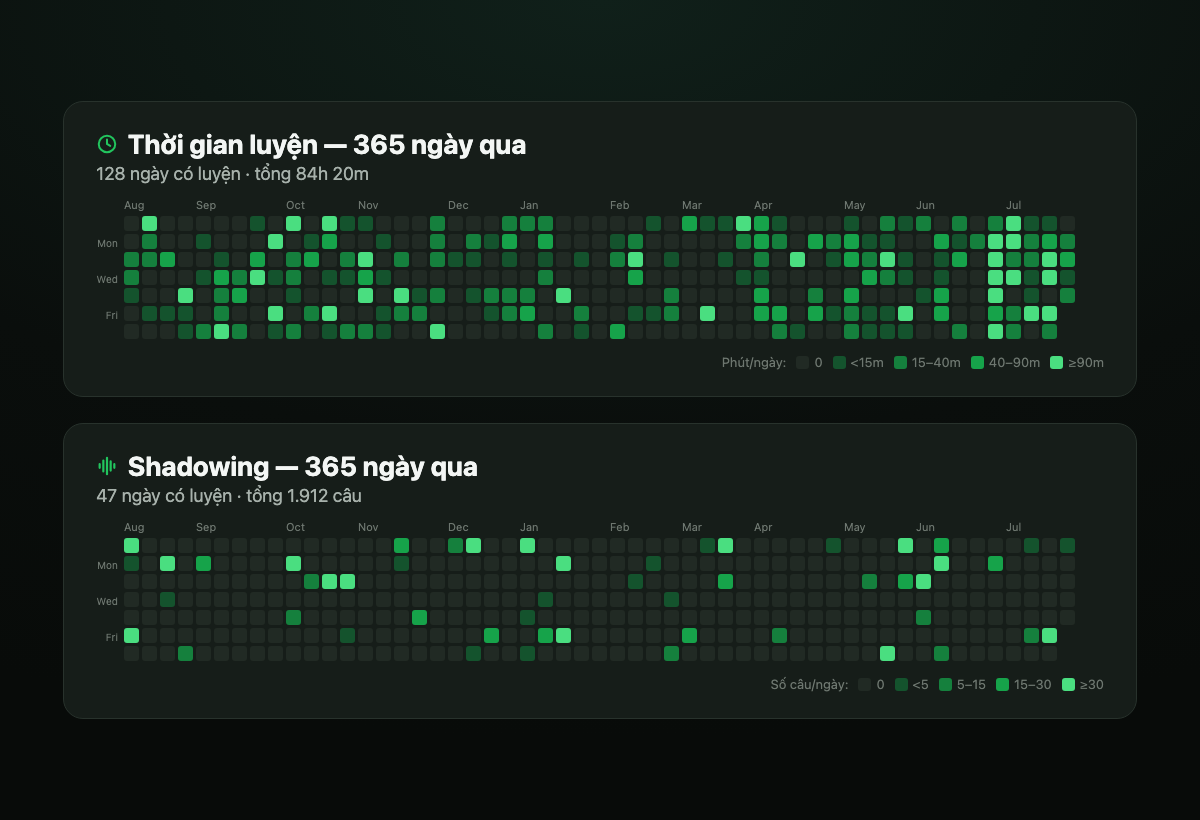
Activity heatmaps — your last 365 days
New Features
- Hall of Fame & monthly honors: The leaderboard now crowns the three most diligent learners of last month on a podium right at the top, and a link opens the Hall of Fame — an archive of every past week and month. Effort, remembered.
Hall of Fame — trophies for the most diligent - Trophies you keep: Finish in the weekly or monthly top 10 and you earn a trophy that lives on your profile — gold for the most diligent, silver for ranks 2–3, bronze for 4–10. A shelf that grows with your streak.
- Winners get an email: When a week or month wraps up, the top 10 receive a congratulations email linking straight to that period's honor board. A little cheer for showing up.
Improvements
- A tidier leaderboard: The live standings got a cleaner look with medal accents for the top three, and every honor banner carries a motivational quote that changes each visit. Nicer to check where you stand.
Improvements
- Much smoother typing: The learn page could stutter slightly with every keystroke, especially on long videos. We streamlined how it grades your typing and saves progress behind the scenes, so letters now appear the instant you type them. A few-hundred-sentence video feels as smooth as a short clip.
- The Next button stays put in Focus mode: The button used to shift up and down as tips or results appeared and disappeared; now it's anchored to the middle of the screen and everything else arranges itself around it. No mis-clicks, no hunting for the button.
Fixes
- Answers show apostrophes correctly: In the results, words like "here's" and "don't" now keep their apostrophe instead of showing "heres" or "dont". You still never need to type apostrophes — scoring is unchanged. The answer reads exactly as it's written.
Improvements
- No more clipped word endings: In Steady, Natural and Fluent modes, each segment now plays a fraction of a second longer at the end, so the final word finishes instead of getting cut off — the start point and looping are unchanged. Hear the whole phrase, right down to the last word.
New Features
- Focus mode: One click on the learn page opens a fullscreen, distraction-free practice room — no menus, no sidebar, just an audio waveform, your typing box, and the live diff. Exit anytime with Esc. One phrase. One task. Nothing else.
Focus mode — distraction-free practice - Everything you need stays in reach: Focus mode keeps the full practice toolkit — replay, play/pause, skip, Easy mode, voice recording, per-phrase translations, and all the keyboard shortcuts (listed quietly at the bottom of the screen). Fewer distractions, zero lost features.
- Tap a word, get the dictionary right there: In focus mode the word dictionary pops up next to the word you clicked, like a context menu, instead of pushing the page around. Look it up without losing your place.
Improvements
- Original sentence with the full translation: When the full-sentence translation appears on the last phrase, it now shows the original English sentence alongside it. Read the source and its meaning together.
- "Continue where you left off" remembers your choice: The resume dialog has a fresh look and a "don't ask again" option — it can auto-resume or stay quiet from then on. Answer once, never again.
- Cleaner dialogs across the learn page: The upgrade, sign-in, and login-required dialogs were redesigned into one calm, consistent style. Less noise at important moments.
- Vietnam bank-transfer payment is easier to find: The upgrade dialog now links to VietQR bank-transfer checkout even when you're using the English interface. Pay in VND from anywhere in the app.
Fixes
- Signing out now clears practice data on the device: A signed-out account's typed sentences no longer linger for the next visitor on shared computers. Your practice stays yours.
- Paid members are no longer asked to upgrade: On partially-processed videos, PRO members now get a "process the full video" action instead of an upgrade pitch. The right action for the right plan.
- Free plan gets 3 minutes on processed videos: Free accounts can now practice the first 3 minutes of any fully-processed video — three times what signed-out visitors get. Sign in for more, upgrade to PRO for full-length videos.
New Features
- Phrase-by-phrase translations: In Steady and Natural modes, each phrase now shows its own translation as you practice it, and the full-sentence translation appears on the last phrase. Understand each chunk on its own, then see how the whole sentence fits together.
Phrase-by-phrase translations - Translations in your own language: Lessons can now be translated into your native language, not just Vietnamese. If a lesson doesn't have your language yet, PRO members can add it in one click — and it's then shared with everyone who speaks it. Learn English from your mother tongue.
Improvements
- Native language in Settings: There's now a Native Language setting — the language we translate lessons into — that you can change anytime. No more hunting for where to set it.
- Clearer onboarding: The welcome step now explains that your native language is what lessons get translated into. Know exactly what your choice does.
- Rotating tips on the learn page: Tips — and the occasional quick survey — now take turns instead of getting stuck on one, with a calm gap in between so nothing pops up back-to-back. More variety, less nagging.
Improvements
- Author badges on feedback: Posts and comments now show an "Admin" badge for the team and a PRO decoration on paid members' avatars, so official replies are easy to spot. Know at a glance which replies come from us.
- Admin badge on profiles: Team members' profile pages now carry the same "Admin" badge. Consistent identity across the whole app.
- Shortcut cheatsheet on the learn page: When the right panel has nothing else to show, it now displays a quiet keyboard-shortcut list — Tab to replay, Enter to check, and more. Practice faster without hunting for the keys.
New Features
- Dictation modes: Choose how finely sentences are split — Steady (short phrases), Natural (clauses), or Fluent (whole sentences). Each level keeps its own progress. Match the difficulty to your level and grow into longer chunks.
Dictation modes — switch how sentences are split - Feedback board: Suggest features, upvote what matters, and discuss in comments — right inside the app at easydictation.app/feedback. Your voice shapes what we build next, with no third-party site needed.
Improvements
- Guided tour matches your theme: The in-app walkthrough now follows light and dark mode with a clearer highlight on the area it's pointing at. Easier to follow along — no more jarring bright popup in dark mode.
Fixes
- Blog link in the header: The Blog is now reachable straight from the homepage header. One click to guides and updates — no need to hunt for the link.
- Language switch no longer breaks blog links: Switching between English and Vietnamese on a blog post now keeps you on the page instead of hitting a 404. Read in your language without losing your place.
New Features
- Blog: We've launched a blog at easydictation.app/blog — guides and product updates in both English and Vietnamese. A place to pick up tips and follow what's new.
New Features
- Helpful tips while you learn: The learn page now shows an occasional one-line tip — keyboard shortcuts, saving words, study habits — right where you practise. You pick up handy shortcuts and features without digging through the menus.
Helpful tips while you learn
New Features
- In-lesson quick survey: Every now and then a small one-line survey appears on the learn page so you can rate your satisfaction or pick your favourite feature — answer in a single tap, or dismiss it. Your voice directly shapes what we build next, so EasyDictation keeps getting better at the way you learn.
In-lesson quick survey
New Features
- Vocabulary Mastered Tracking: Mark and track the words you've truly learned. You can see how far you've come and know which words to focus on next.
- Daily Engagement Statistics: See your daily learning stats and streaks. Helps you build a steady study habit and stay motivated every day.
Improvements
- Smoother, nicer flashcard game animations. Practice feels more engaging and less repetitive.
- Faster vocabulary list loading. Less waiting, more learning.
New Features
- Flashcard Game Mode: Practice your vocabulary with interactive flashcards. You remember words longer through active recall instead of passive reading.
- Public Vocabulary Sets: Browse and import vocabulary from ready-made sets. Start learning right away without typing out every word.
- Games Section: A dedicated area for learning games. Studying feels lighter and more fun.
Improvements
- Redesigned vocabulary management interface. Managing and reviewing words is easier and faster.
- Better support for Vietnamese learners. Clearer, friendlier translations and guidance.
Initial Release
- YouTube video dictation with AI transcription. Practise listening with the content you actually enjoy.
- Vocabulary tracking from dictation mistakes. Turns your mistakes into the most useful word list for you.
- Leaderboard and user profiles. Adds friendly competition and a way to track your journey.
- Multi-language support (English/Vietnamese). Learn comfortably in the language you know best.