
Back to changelog
v2.12.0August 27, 2026
Improvements
- The typing box now sits directly under the video: Listening in the middle column while typing in the right one meant a sideways glance for every sentence, and a stiff neck after a long session. The replay buttons and the typing box now live under the video, in the same column: finish listening, drop your eyes, type; finish typing, look up, next sentence. The right column keeps only the score, the hidden words and the translation. On short screens the box stays pinned to the bottom edge, so it never scrolls away. Look and act on one axis.
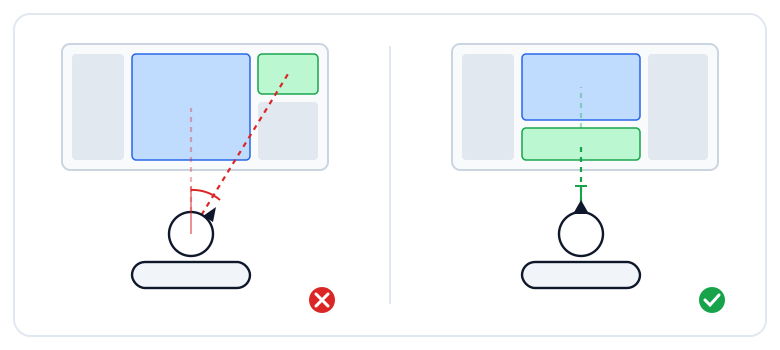
Look and act on one axis — the typing box now sits under the videoRead the post - Today's goals moved to the right column, with a collapse button: The goal box heads the right column. If you don't want the progress in view all session, tap the arrow in its footer to fold it down to the progress bar and your streak; the choice is remembered.
- Video title and the speed / hide video / captions buttons share one row: The three buttons adjust the thing right above them, so they now sit next to the title. The avatars of people who practised and the leaderboard button moved to the bottom of the left column.
- Tighter on phones and iPads: A shorter footer, icon-only Store / Blog / Language buttons in the navigation bar, and the goal box and leaderboard row hidden to save room.
Fixes
- The "tap a hidden word" hint shows on phones again: It was hidden below small screen sizes while still leaving a silent gap right above the word row.